Monday, 8 October 2012

Most trusted Free webhosting website

If we have  a blog or website , webhosting is important to host your blog.

web hosting is use for put our files such as images, sound, script, videos and many more. We can use use paid hosting or free hosting, but I suggested you to use 000webhost as your web hosting. 000webhost is a free web hosting service with full feature and no force ads. 000webhost is an amazing web hosting service. It's free web hosting that gives many features such as:

- 250 MB Disk Space
- 100 GB Data Transfer
- cPanel Control Panel
- Fantastico De Luxe 1-Click Autoinstaller
- Website Builder Software
- PHP Scripts Autoinstaller
- MySQL Databases
- Curl, GD2 library, ImageMagick, Zend
- and much more features are enabled

I also preferred this webhosting.
But to make your web hosting running well you must folow their rule.
Here is the most important rules:

1. No adult content or any kind.
2. No warez / hacking / phishing sites
3. No mass mailers / spammers (account will be automatically suspended if you will try to send mass mail), so if your software supports such feature, disable it right now.
4. We do not allow any public image or file hosting server scripts to be run.
5. Chat, proxy, or file download scripts are not allowed.
6. Paid-to-surf, auto-surm, buxto, and any other similar scripts are banned
7. We do not allow online gaming scripts such as ogame, mafia, etc..
8. Nulled software such as ip.board or vbulletin is not allowed to be hosted
9. Account cannot be used only to store files.

Get all your software serials

YouSerials and Serials.ws is a search engine for software serials.

The idea is to have abackup of all software registration numbers that we use.
Each serial key can be voted on by other users, increasing or decreasing its reputation based on its authenticity.
It’s also useful if your Operating system had crashed and you need a reinstall
but don’t have all the serials stored or are lost.

http://www.serials.ws/

How to Hack Windows Administrator Password

When you forgot your PC password or when you want to gain access to a computer for which
you do not know the password and you want to change that system passord.

Steps:
- Open the command prompt (Start->Run->type cmd->Enter)

- Now type net user and press Enter.

- Now the system will show you a list of user accounts on the PC. for example you need to reset the password of the account by name Tom, then do as follows

- Type net user Tom * and press Enter. Now the system will ask you to enter the new password for the account fill the password. That’s it. Now you’ve successfully reset the password for Tom without knowing his old password. Cheers !!

Note : This trick works for Win 2000, XP, Vista and Win 7.

Hope this trick will help you to prevent reinstalling windows again .

Reliance Free Gprs Hack 2012

RELIANCE has both cdma and gsm network.to access mobile gprs free in reliance

you have to configure the following settings in your gprs settings of your mobile phone.once you do it you could access free gprs in your mobile.

>Home page-http://wap.rworld.co.in/gsm/index.wml
>APN-SMARTWAP
>Ip-97.253.29.199
>Port-8080

USING these reliance gprs settings enjoy free gprs free of cost.

How To Transfer Balance In Tata Docomo

I would like to share some  Official trick to transfer Balance from one docomo mobile number to another.
So, To transfer balance in  Docomo mobile, simple follow below procedure.
1.Type  ” BT MobileNumber amount ” and send it to  >> 54321
For Example, i want to transfer  Rs.50 in to 9033XXXXXX mobile number  then
BT 9033XXXXXX 50
2. Now Send that message to  54321
in reverse,That mobile number(A mobile number that needs to recieve balance- here in our Example  9033XXXXXX ) needs to send  revese message
RBT   Transaction ID and send It it to 54321

Charges for Docomo to docomo Balalnce Transfer :


It  will be charged at Re.1 and and reverse SMS is free. so, So, one time balance Transfer charge you only 1 Rs.
Conditions:
    The sender’s account balance for “Balance Transfer” has to be Transfer Amount + Rs.1 at the time of transfer.
  • If balance is not sufficient the transfer will be declined. However, the SMS will be charged.
  • In case of Reversals the amount reversed will be dependent on the balance available with the recipient.
  • The system will recognize “BT” or “bt” or “Bt”. means no case sensetive. you can type either way.
  • You can send minimum of Rs.5 and a maximum of Rs.169

How to Hack a Gmail Account

There are two ways of hacking any gmail a/c. They are:

Keylogging : It is a software that creates a server.exe file and send this server.exefilevia email to the victims email id . When the victim open the email to read it automatically getsinstalled on victims computer. it is in the way it is attached to the victims VLC player ,means when victim will run VLC player, the server.exe file automatically reuns and collects all information and at the end it mails all login detaills to the sender's mail id
without any alert notification.the Best Keylogger is Snipersky .

Phising : This is a technique in which a fake gmail login page is created which is identical to the real gmail login page.
Steps:
- it is coded using the source code of gmail login page.
- it is tested by hackers , if it is tested then
- it is installed on hosting server via FTP .
- After this to hide the URL , the URL shortner tool is used and link is changed
- Now this Url link is send to the victim using Email , Facebbok , Twitter etc.

Now when user opens the link and they didn't look at the URL and fillups their login
details and thus their email and password are stored in database and gets hacked .

HOW TO PREVENT GOOGLE FROM TRACKING YOU

Much has been made of Google's new privacy policy, which takes effect March 1. If you're concerned
about Google misusing your personal information or sharing too much of it with advertisers and others, there are plenty of ways to avoid Web trackers.

The Electronic Frontier Foundation offers the Panopticlick service that rates the anonymity of your browser. The test shows you the identifiable information provided by your browser and generates a numerical rating that indicates how easy it would be to identify you based solely on your browser's fingerprint.

According the the entropy theory explained by Peter Eckersley on the EFF's DeepLinks blog, 33 bits of entropy are sufficient to identify a person. According to Eckersley, knowing a person's birth date and month (not year) and ZIP code gives you 32 bits of entropy. Also knowing the person's gender (50-50, so one bit of entropy) gets you to the identifiable threshold of 33 bits.

In some ways, Google's explanation of personalized ads is more informative than the company's privacy policy. Of course it's in Google's best interest to keep you in the personalized-ads fold, but the company does its best to present personalization as a boon to users. It certainly does help pay for the "free" services we've come to rely on.

Use Google's own tools to opt out of ad networks

Prominent in the Google privacy policy are links to services that let you view and manage the information you share with Google. Some of this personal data you volunteer, and some of it is collected by Google as you search, browse, and use other services.

To view everything (almost) Google knows about you, open the Google Dashboard. Here you can access all the services associated with your Google account: Gmail, Google Docs, YouTube, Picasa, Blogger, AdSense, and every other Google property. The dashboard also lets you manage your contacts, calendar, Google Groups, Web history, Google Voice account, and other services.


More importantly, you can view and edit the personal information stored by each Google service, or delete the service altogether. To see which other services have access to the account's information, click "Websites authorized to access the account" at the top of the Dashboard. To block an authorized service from accessing the account, click Revoke Access next to the service name.


The Google Ads Preferences Manager lets you block specific advertisers or opt out of all targeted advertising. Click the "Ads on the web" link in the left column and then choose "add or edit" under "Your categories and demographics" to select the categories of ads you want to be served or to opt out of personalized ads.


Another option is to use Google's Keep My Opt-Outs extension for Chrome. Google also participates in the Network Advertising Initiative's opt-out program. Select some or all of the dozens of online advertisers from the NAI program and then click Submit to place a cookie in your browser instructing the ad networks not to serve personalized ads.

Free add-on for Firefox and Google Chrome targets tracking cookies

Several free browser extensions help you identify and block the companies that are tracking you on the Web. For example, Ghostery (available in versions for Firefox and Chrome) adds an icon to your browser toolbar showing the number of trackers on the current page. Click the icon to see a list of the trackers and view options for blocking or white-listing specific ones.

The free Disconnect extension (also available for Facebook and Chrome) takes a more direct approach to wiping your Web tracks. Disconnect blocks tracking by Google, Facebook, Twitter, Yahoo, and Digg. It also has an option for depersonalizing searches.

As with Ghostery, Disconnect places an icon in the browser toolbar that shows the number of elements it has blocked on the current page. Click the icon to open a window showing the number of trackers blocked for each service. To unblock tracking for one of the services, click its entry. (Note that I tested Disconnect only with Google; also, blocking of international Google domains is not yet available, according to Disconnect's developers.)

When I tested Disconnect, I had to sign into Gmail, Google Docs, and other Google services every time I returned to or refreshed one of those pages, which is understandable considering that blocking the cookie prevents Google from keeping you signed in. Otherwise I was able to use Google services without a problem, including search, viewing and sending Gmail, and accessing, creating, uploading, and downloading Google Docs files.

While people are rightly concerned about who is watching and recording their Web activities, at least Google makes it possible to use the company's services without being too forthcoming with your personal information. ISPs and other Web services do as much tracking as Google--or more--but garner far fewer headlines. For a detailed look at the state of privacy in the digital world, read about the Electronic Frontier Foundation's Surveillance Self-Defenseproject.

After all, the true threat to privacy is from the trackers we don't know about, and who aren't household names.

Trick to Access Your Facebook Account Without Internet Connection

Can you Imagine that you are using Facebook Account without Internet
 Connection. Is This Really Possible? Yes This thing can Possible now.

Facebook is become a living necessity for every person in the world.To access Facebook all we need Internet Connection via PC or GPRS enabled mobile . But what to do if you dont'  have a  GPRSor3G Compatible Phone or you dont have
any Internet Connection subscribed or forgot to  renew your internet pack.

 Here ,  today Iam  Posting a Trick to Access   Facebook without the need  of any  Internet Connection Through PC or GPRS phone.

Facebook by Fonetwish  brings the Power of  Internet to every mobilephone .No data  connections,no applications all you to do is just dial *325#  or *fbk# from your moble phone, then enter yur Facebook Username and password. And you can access almost all the features on Facebook  which you normally to do on your  computer browser.


The following features which Fonetwish Brings To You : -
  • News Feeds
  • Wallposts
  • Notifications
  • Update Status
  • Manage Friends
  • Chat
  • Quik Frnd


  This Fonetwish  service is currently available
  on Airtel, Aircel , Idea and Tata Docomo (India)
  & XLcom, Telkomsel (Indonesia).

How to hack facebook account

How to hack any facebook account easily by Reverting/Reseting pass of your victim NO keyloging pishing required

Here is one more interesting tip on how to hack a Facebook account by the method of reverting the password.This method does not involve any skill or anything just a brain would be enough to get you through this trick ! Well,you might think that it is impossible but it is actually true that you can hack any facebook account ! So before we start i would like to tell you what “Reverting” actually means…


What is Reverting ?

Reverting is the process of resetting a password without the knowledge of the actual user ! So this is basically a low level of hacking but it does the job for you !
For more on reverting go here : What exactly is reverting ?
How do I hack my friend’s Facebook ?
Make sure your not logged in to your account.If you are then make sure you sign out and then follow the following methods

1.Go to this link:
http://www.facebook.com/help/contact.php?show_form=hack_login_changed http://www.facebook.com/help/contact.php?show_form=hacked_cannot_identify

That is the form that you will be using in order to hack your user.

2.Then in “Your E-mail Address” type your E-mail address.

3.Then apply the following options as in the image below.

4.Once you have done that,You will have a question asking “Email associated with the compromised account.” – In that just type “No” and nothing else other than that !

5.In “Your contact email address.” – Type your own email for you to receive the Password Reset Link.

6.In the “Full Name of the Account.” – Type the Name of your victim if you know.If you don’t then:

a.Try finding the Name of the victim by just searching his/her e-mail on Facebook.

b.If that doesn’t work then google the E-mail address of your Victim,that might give you some details.

c.If that also doesn’t work then use the following sites to get them
http://com.lullar.com/
http://www.pipl.com/email/
So if you follow one of the above methods you should be getting the Full Name of your victim.Now lets move on to the next step

7.”Date Of Birth” – In this column you have to enter the Birthday of your Victim.If you know him personally then you should be knowing it.If not you can just social engineer him and somehow make him tell it.Once you get it you have to enter it in that.

8.”URL (web address) of your compromised profile.” – This is just the profile URL of your Victim which can be got easily(Usually of the form: http://www.facebook.com/profile.php?id=we45r)

9.Now your all set ! Before you submit the form just make sure you recheck the whole form if you have done the right thing.Once you do so just click on “Submit”

10.Thats it ! You have done it ! Now you just have to wait for Facebook team to look up for your request ! Once they approve it they will send a link to reset your victim’s Password !

Sunday, 7 October 2012

Hacking Anothers Computer Using IP Address

The first thing you needed to specify is whether the IP address obtained by you is in your LAN?

If its in your LAN,then follow these steps:

1) Run cmd(commandprompt)

2) Type nbtstat -A

For example,if you have found the IP address 123.23.13.22 available and with open ports,then type:
nbtstat -A 123.23.13.22
If you get the hex code <20> beside the name of the victim's computer, then it means that the victim's computer has sharing enabled(Its a good sign!)

3) Now if you get that hex code <20> then type:

net use z: \\123.23.13.22\SharedDocs

It shows 'The command completed successfully'

4) Now open My computer,there you will find the drive Z,open it,its the shared documents folder of the victim.

5) Now if you want to access the drives of that system,then run cmd,then type:
net use y: \\123.23.13.22\C$ "" /u:""

Now it will prompt for you to give the username and password of that system...The username will be shown on the drive Z as 'SharedDocs on xxxxxx(123.23.13.22)'


6) Try guessing the password or Bruteforce it. After getting the password,type it and you will get the access to your target computer.

7) If the message 'Access is denied' appears,then it means you have to evade his firewall..,use Firekill Firewall Killer2000

8)After doing this,repeat the step 5 and give the username and password and it will surely show
' The command completed successfully.'

9) Thats it...you will be in the root of the victim's com.


(Plz note: Do this act only to prevent hacking, not to implement it.)

Vodafone Hack For Free GPRS

Vodafone Hack For Free GPRS

This method has been tested on different mobiles and has been confirmed to be working.
Followng are the Settings you require to configure on your Mobile:

Account Name: Vodafone_gprs
Homepage: http://live.vodafone.in
User Name: (no need)
Pass: (no need)

Access Point Settings:-
Proxy: Enabled
Proxy Address: 10.10.1.100
Proxy Port: 9401
Data Bearer: Packet Data

Bearer Settings:-
Packet Data Access Point: portalnmms
Network type: IPV4
Authentication: normal
User Name: (no need)
Password: (no need)

*IF that happen this settings is not working then change the proxy port number to:-

Proxy Port: 9401

Airtel Hack For Free Internet Access

Airtel Hack For Free Internet Access

All you need to have is
–>PC
–>Serial/USB cable/Bluetooth dongle
–>Any Browser(I suggest Opera as we can browse both wap and other sites)

Follow These Steps:
—>Activate Airtel Live sending a message MASALA Active to 121
—>Create a profile with the following settings in your data account under Data Communication

GATEWAY : 100.1.200.99
APN : airtelfun.com
USERNAME : blank
PASSWORD : blank
PASS REQ : OFF
ALLOW CALLS : AUTOMATIC
IPADDRESS :
DNSADDRESS :
DATA COMP : OFF
HEADER COMP : OFF

and then Under INTERNET PROFILES,

INTERNET MODE : HTTP or WAP (both works)
USE PROXY : YES
IP ADDRESS : 100.1.200.99
PORT : 8080
USERNAME :
PASSWORD :

–>Create a new dial-up connection on your pc after connecting the mobile to pc,using the NEW CONNECTION WIZARD as follows

ISP Name : Anyname
Phone Number : *99***1#
Username and Password : blank

–>Configure your browser to use the proxy 100.1.200.99 and port 8080.

–>Connect to the dial-up account. You will be connected at 115.2kbps

—>Now if you try to access any site on your mobile you ll get an error message like “Access Denied”

—>Open your browser, and start browsing and voila it opens the regular sites and if u beleive ull get a d/l speed of 5-6 kbps

Common Errors:
If you are getting any error wile dialing a dial up connection than go to
Control panel>> Phone and modem>>>select modem and click on its properties >>advanced
and enter the following initialization commands
CODE
AT+CGDCONT=2, “IP”,”airtelfun.com”,”",0,0

Now it should be connected without any error....

Increase IDM Download Speed using IDM Optimizer

Internet Download Manager as we said is the best download manager right now available as compared to any other download manager like DAP, Microsoft Lightweight Download Manager,
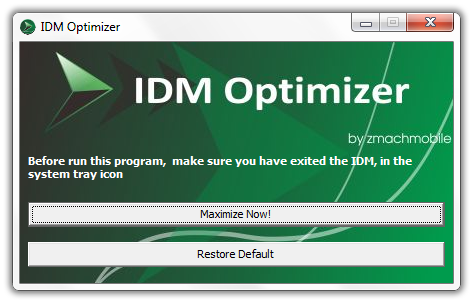
Well we just go t our hands on IDM Optimizer, it’s a small utility which boosts your IDM speed by modifying some registry entries like it will change Connection Speed, Connection type, Max Connection Numbers and some other few entries.
So this is what above kind of Window you will see when you will fire up the IDM Optimizer software. So it has a simple Maximize Now button which when clicked will popup a note to restart IDM so that it can take effect. Well you can see it also has a Restore Default button which will restore all the settings which IDM came with you can use that if you think that you are not getting good speeds.
idm optimizer

How to Use IDM Optimizer :

1. Download IDM Optimizer.
2. Now make sure IDM is installed on your PC, now just fire up your IDM Optimizer and than you will see Window like above just click on Maximize Now and you will get a note asking you to restart your IDM do that and once restart your PC.
3. That’s it now your IDM is boosted with speed, try to download any file and check out out if speeds are good or not.
4. If you want to restore your default settings than you can click on Restore Default.
That’s it guys now you have boosted your IDM with Speed, optimized it for faster downloads have fun :) and do share this post with all friends.

Share Computer’s Internet Connection with other Devices

You might be using a Hi Speed dongle for 3G internet access or a Broadband Connection using LAN Cable, if you do not have a Router installed in your home than you cannot access a Internet Connection on your other handheld devices, but with Connectify this can be connected easily with just one click.
Connectify-windows-software
With Connectify you can simply connect unlimited devices to your computers internet connection, pairing is really easy and can be done in few minutes using Wi-Fi. So if you are interested just follow below steps to get it installed and running on your computer.

Follow below steps :

1. Download Connectify Software for your PC.
2. Now after you have downloaded it, just install it in a normal way and after successful installation you will be promoted to Reboot your computer do that its important.
3. Now after Reboot it will automatically start and show window like in the image above, just change the name if you want too and add a 8 digits password.
4. Now choose the internet connection you wanna share I am sharing my MTS 3G Dongle internet connection with my iPhone.
5. So after you have chosen the connection, just pick up how you wanna share your connection the best one is Wi-Fi but if you don’t have than you can choose Bluetooth or any other mentioned.
6. Now just click on Start Hotspot and you Hotspot is ready to be searched and to be connected, just open your mobile Wi-Fi settings menu and search for available connection and you will see the above name you have mentioned displaying just hit that and enter the 8 digits password you kept.
7. Now you are connected with your Internet Connection, so now you can browse or do anything you wanted to do, well you can see how many people are connected in the second window in the above image, that’s just for keeping track on people using your Wi-Fi connection.


So now enjoy Internet Connection Tethering for free and easily on your any handheld devices equipped with Wi-Fi, well that’s it folks if you like this tutorial than please share it with your friends that might make us more strong.

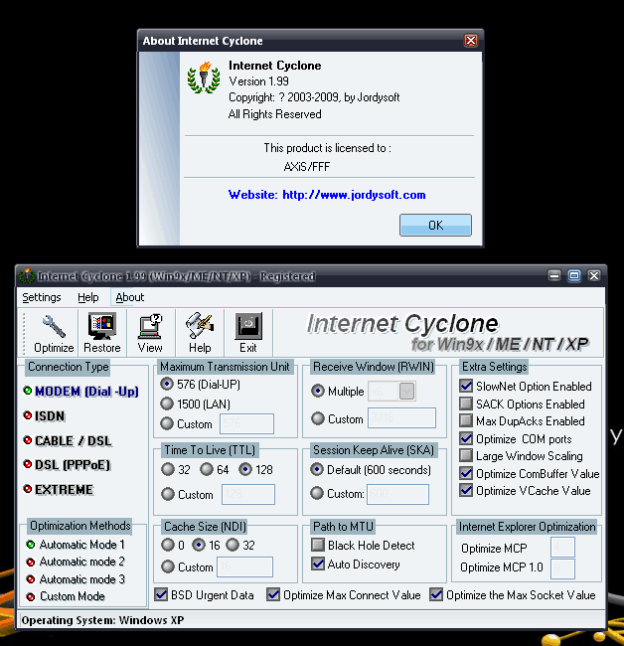
Optimizing your Internet Speed using Internet Cyclone

Internet-cyclone-1.99

How to Make your Nokia Symbian Phone a Wi-Fi Hotspot

So do you want to use your Nokia phone as Wi-Fi Hotspot so that you can access internet on different laptops and other portable devices through your mobile phone than tune into this post because we are going to show you how you can make your Nokia Phone into a Wi-Fi Hotspot.Joikuspot
JoikuSpot is an awesome application for mobile phone which makes your Nokia Phone a Wi-Fi Hotspot. So that you can use its 3G connection with you laptop or other wi-fi enabled device.
JoikuSpot has three version 2012, premium and light version tats available for free. The free version comes with some limited version bundled to it but still for free you can easily convert your 3G mobile connection and stream it through Wi-Fi. Well it’s a good + free app which you will surely like so have fun and enjoy Symbian lovers.you can download it here http://www.joiku.com/products/joikuspot_light


How to Run Symbian Applications on Windows PC

If you own a Nokia Symbian phone and you want to use its application on PC than you can do that using the official emulator provided by Nokia for Windows PC. Well it’s a simple emulator with a normal graphical interface which you can use to run your Symbian applications on PC. So now any game or any entertainment app fro Symbian device can be used on PC, so follow steps below on how to use it on PC.Nokia Symbian SDK

Steps to Install Nokia Symbian SDK On PC :

1. Download Nokia Symbian SDK from Official Website.
2. After you have downloaded the above software just install it on your PC using the normal steps. After successful installation just reboot your PC.
3. Now just navigate to Start > Program files > Nokia Developer Tools > Symbian SDK > Emulator and your Emulator will be launched.
4. Now your Emulator will look something like on the image on the right, just click on File > Open and choose your Symbian Application you wanna fire up.
5. Now your application will be loaded, use it play with it and have fun.

BigRock Flat Rs.100 Off on Domains & 25% Off on Hosting [Oct]

BigRock India’s website hosting and serving platform always gives awesome promotional offers, schemes and coupons for enriching every single individual to get online and start out their business. Well for this October month they have another major scheme called OCTAFF means off for October. Well for this month you can get upto Rs.100 off on new domains so that means domains free of cost and 25% off on hosting.bigrock-october-offer
So its like an awesome deal for upcoming new bloggers who just wanted to migrate their BlogSpot domain name to Custom Domain as they will get their business online without spending any single penny.
So you just need to visit BigRock.in and after you have selected your domain name and you on to the checkout page just add OCTAFF coupon code in the field provided and click on apply, that’s it now if you have just opted for  a domain name your amount will get to 0 and you can proceed without paying anything.
Remember This offer is valid from 1-10-2012 till 1-11-2012 so it’s a full one month offer and can be availed by anyone. So have fun and enjoy your free dotcoming.

How to Turn Off Computer using your Mobile Phone Easily

Are you a downloading addict and love to download loads off stuff from the internet and when the download is over your computer remains on and increases wastage for everything. You seriously make your computer hot hour by hour it remains on so for this serious issue you have to think off something innovative and in that regard Airytec delivers a light weight software for your pc making it easier for you to switch off your computer from anywhere using any web enabled device like mobile phone etc.airytec web interface

How to use Airytec Switch Off Software on PC :

Well using Airytec Switch Off software in pc is really an ease you just need to follow simple instructions given below and you will be ready to switch off your pc from any where by just using your mobile device.
  1. Download Airytec Switch Off Software and install it on your pc.
  2. After installing you have to Enable Web Interface.
    • Click Airytec icon in the status bar.
    • Navigate to Options > Remote > Enable Web Interface.
    • Just check mark it.
  3. Now to ensure that your web interface is accessible just open up your default browser and type down http://localhost:8000. If you have changed the post number while enabling Web Interface than you should replace 8000 with that number.
  4. Now when you will connect from another mobile device to shut down your pc you have replace the localhost with the iP address of the computer which you wanted to shutdown.

How to Change your Voice Pitch on Skype for Windows

Skype is the best client for long distance communication and its even expanding all the possibilities for connecting even a low end person by giving some easier access on few smaller phones including big smartphones. Recently Facebook acquired Skype and people can do video chatting with all their friends on Facebook. clown fish settings
So we have earlier posted many stuff for Skype like Hidden Skype Emoticons and much more so today we are posting on how you can change your voice on Skype while chatting with other friend well it will be a real fun means becoming a alien or a predator and making fun of your friends.
ClownFish Translator is a small plugin for Skype which works together united with it and make all these pitch changing scene live. I comes bundled with many options and tweaks which you can configure like in the image on the right. Aside of voice changing it has many more options which you can use and enjoy this amazing small plugin.

How to use ClownFish Translator for changing voice on Skype :

So now if you wanna have some fun with all your friends you can check below tutorial on how you can use it fro changing your voice pitch on Skype and give them a huge laugh.
1. Download ClownFish Translator Plugin
skype clownfish access2. After download is complete just install it and your Skype will popup asking permission to allow ClownFish use Skype, just click on Allow access like in the above image. (If Skype does not pops up automatically simply open it manually.
3. So now everything is up and running, now just click on the taskbar and than right click on the ClownFish icon and you will see settings in the first image, hover on the voice changer option and than choose the one you like.
4. Now start calling your friend and speak anything, now your normal voice is transformed and converted into the chosen one which your friend will hear. If you wanna test this first just call the echo test call and start recording your voice you will see that your pitch is changed.
Now you are done with this another pranking tutorial for Skype voice changing, hope you liked it and will share with all your friends, Kudos !…

2 Free & Paid Tools to Automatically Shutdown your PC

If you are a big lover of games, downloading big files from the internet and browsing kind of thing than you might be aware that computers that are delighting you needs some time to rest out in peace. Well you might not leave it when you are awake but what about when you are slept or you are doing some other work you should obviously shutdown your pc so that both its life and electricity can be saved. Well if you usually download files in the night and after words your pc is free you can use some tools provided below to shut it down automatically so that next day it can be used as a fresh pc.

#1. Simple Shutdown Timer [Free Tool]

simple-shutdown-timerSimple shutdown timer is a free tool for timing out your pc shutdown and reboot automatically. You just need to start out the timer and as soon as it hits 0 the pc will be executed with action you have opted for. Well it available for free so it comes with literally no other option else than taking out one command at a time. You can download Simple Shutdown Timer from this [Link]

#2. PC Auto Shutdown [Paid Tool]

pc-auto-shutdownPC Auto Shutdown is an awesome paid tool from taking out rebooting tasks in a serious way. Well as I said its paid version it comes with many amazing features certainly awesome ones I guess. With this there is no times but a fix time scheduling, if you want your pc to reboot in the morning at some desired time than you can use out this software and it works like a charm. Now frankly speaking this tool cost $19.95 but I have not purchased it out and I used the patched up version provided on torrents and this tool works and I love it out, well if you wanna give it a try than company is providing free 15 days trial period for checking this tool out. You can download PC Auto Shutdown from this    http://download.cnet.com/PC-Auto-Shutdown/3000-2344_4-10399335.html

Top 5 Antivirus Programs for Protecting your Computer

Antiviruses are the main component for any new or old computer, usually whenever you install a new Windows Package the first thing you do is too complete the installation of your Antivirus program so that your computer stays safe from any threat or online bazookas. Well for this purpose many online renowned company's develops an Antivirus program that can protect you from almost all online threats and viruses but this is the growing world so threats grows everyday but still there are some programs that get update day by day and block the new viruses too. Below is the list of 5 top most renowned antivirus programs that you can install in your pc and enjoy safe browsing and downloading environment.
  1. bitdefender boxBitdefender :: is an antivirus program developed by Romania based company called "Softwin", it’s the top most renowned program in antivirus world, with its huge sets of protecting features it tops out the list. Its features include online links scanning, search advisor, PC optimizations tools and scheduling scanning. It comes in three packages, Antivirus, Internet Security and Total Security Suite. I personally prefer this Antivirus as it seriously defends your pc from any external and internal attack.
  2. kaspersky boxKaspersky :: antivirus does not need any reference to get on spotlight as it’s the most renowned antivirus engine developed by Kaspersky Lab, maybe a newbie will be aware about it and recommends installing it in pc for ultimate protection. It comes will the same features as with Bitdefender + a very awesome feature of scanning illegal websites providing pirated content. Well overall its cheaper than Bitdefender and hence used more virally than any other antivirus engine.
  3. webroot boxWebRoot :: is another good antivirus engine that many teenagers recommend due to its speeds but still lacks many options and scanning capabilities like Bitdefender and Kaspersky. Its End Point Security installs in less than 6 sec and scans your pc in less than 1 min interval. There’s an mobile app too which you can install and protect your mobile from viruses getting spread through Bluetooth and other media.
  4. norton boxNorton :: another renowned name a program developed by Symantec Corporation. Proving you will malware removal till the subscription period. Email Spam Filtering and Phishing Protection. Symantec distributes Norton as download, box copy or OEM software. It’s a very rough software so it takes a lot of memory for protecting your pc. Still an awesome program.
  5. eset nod32 boxEset NOD32 :: provides fast and reliable protection for you pc and mobile devices. Its Cyber Security Beta provides protection for your Mac. They are also providing free editions for protecting your pc with their candidate versions. Eset also provides an Android app for protecting your device from browsing and downloading threats. So overall it’s a good and reliable antivirus engine that can suit your entire computer desire.

20 Advanced Tips and Tricks to Higher Gmail Security

Gmail is the main base or the main workstation for any newbie or oldies. This is used by billions of people all over the world for the best email service and to protect it is the main reason for anyone to have a look at this post. Below I just grabbed 20 steps to higher Gmail Security, you might wanna check because Hackers next target can be you can to protect yourself is the main aim of your life. So all the steps below are officially by Gmail for protecting your account. This steps will give you the unbelievable security hence boost your Gmail Experience.
  1. Check for Viruses and malwares : Well you would be having some good virus scanner but you cannot catch 100% infections with any scanner so to experiment and scan with different and online scanner is a good choice.
  2. Operating system should be Up to Date : Updating to official updates may increase your windows security and remove all the holes in it as they release patches to fix vulnerabilities. So its really important to update your system to have more security.
  3. Regular Software Updates : as you update windows you think that software's had been updated to but some software's are not updated but they need serious updates to be performed in order to maintain consistency in your system, software's like Adobe Flash, Java etc. need to be updated manually or sometimes they automatically update depends on settings.
  4. Brower should be Up to Date : make sure your browser is Up to Date as some security patches are also released for browsers, so make sure to update your browser or set their settings to automatic update.
  5. Check Browser Extensions and Plugins : many times there are few plugins or extensions like Gmail manager or something like that which helps you in making some tasks easier so Gmail does not take responsibility for any services like that, so if their service is compromises so is your Gmail Password.
  6. Changing Password : if you account was recently hacked and you recovered it somehow the better option is to change your password to some mixed number and alphabets its really important and Gmail recommends changing your Gmail password after 6 months or so to maintain privacy and security.
  7. Updating Account Recovery Options : whenever you forget your password you may need to recover it so this will help you in recovering.
    • Recovery Email Address : this send an email when you request a reset for the password on the address you have filled for the recovery.
    • SMS Notification : the another way for the recovery is by SMS you will get SMS containing your code.
    • Secret Question : this option will be enabled if you fail with the above options it will ask you the question what you will enter before your password was lost and you will be able to retrieve your password if you answer right.
  8. Turn on 2 step verification : this is an extra layer for security it will send code on your mobile, so that you can sign into your account. This can be enabled in the Google Account Settings.
  9. Check list of authorized websites : check the list for the trusted ones because it could happen that they may have stolen our account data to get your username and passwords.

    To edit the list of authorized websites :
    1. Sign in on the Google Accounts homepage.
    2. Click the My Account link displayed at the top right of the page.
    3. Click Authorizing applications & sites.This page will list all third-party sites you've granted access to.
    4. Click the Revoke Access link to disable access for a site.
  10. Use HTTPS Secure Connection : always use HTTPS this helps you from the stealers from stealing your information whenever you access Gmail from Cyber – CafĂ© or Hotel or other places.gmail-https-connection
  11. Check strange recent activity : this can be really useful as Gmail tracks all the iP address on which Gmail was accessed or we say your account was accessed so if you think there was a suspicious activity then you can check that by clicking the Details link @ the bottom like below and click Sign out all the sessions and simply change your password.gmail-details-tab
  12. Accuracy of Mail Settings : check that all the settings in your Gmail are good accurate like there is no vacation responder on which is automatically replying to all your mails or filters are correctly configured or they will be sending some mails to trash bin etc., so check the settings and correct for the errors.
  13. Checking contacts errors : just go to the contacts tab and check all the contacts if you think that there is a problem in some of your contacts just restore them to an earlier time and you will get all the contacts back.
  14. Username & Password Recovery Emails : sometimes you may have noticed that you get some emails asking you to enter your username and password so that your email address can be recovered that are all fake and should not be trusted so remember that Gmail will send you that kind of mail so beware of those emails.
  15. Beware of Phishing : phishing is a kind of activity in which a fake page is created for the website in order to hack username and password of the victim. So don’t ever enter your username and password after following a link just go directly to Gmail.com in order to access your account.
  16. Sharing Password : don’t try to share your password with third party services as Google does not guarantee for any kind of misbehave if done, so better to use different password for Gmail and different for all other services.
  17. Friends can make prank : I said don’t share your passwords with friends, but the most important thing is that don’t share your passwords, secret questions with your friends as they can play a huge prank on you.
  18. Clear Junk Files : clearing cache, cookies, forms data and passwords is the best way to protect your account fro the strangers hand the best way is to a free cleaner I recommend downloading CCleaner and cleaning all the offline and junk files.
  19. Don’t user Stay Signed In : you all know that stay signed in means that until there is a cleaning process done on your computer your account will be accessible if anyone opens Gmail so its always recommended that not to choose Stay Signed In.
  20. Signing out is the bets option : always sign out whenever you have completed viewing your emails, this is really important don’t think that you are @ home and o probes if you do not sign out its really important and must be done.
So that’s it I hope my tips are good for all the newbies and professionals these are officially by Google on their Security page I just made them simpler to be read and to be accessed so have Fun and please share this article so that all others can be safe and have a happy tech life.

How to use Mobile Camera as PC Webcam - Android - Symbian

Online chatting has been redefined with the video chat technology and more and more webcams are taking birth introducing new and vast technology, well but side by side webcams are somewhat expensive and can do only one task live streaming you to your friends and family members. Well if you wanna save your money and side by side want the same webcam experience, you can convert your mobile camera into PC webcam with small apps and tools easily.
Well we have three best options tat work universally on every platform, so we are going to use Smartcam as our first source, Mobiola web camera and the second source and the third one is specifically for android that’s iP webcam.

smartcam package#1. Smartcam Package :

Smartcam Package simply provides an easy to install option for your all devices, Symbian, Android, iPhone and connect them as a webcam for your pc.
  1. Download Smartcam Package and extract it in your pc, it’s a simple zip package so just right click and choose extract.
  2. Now it contains a .exe file for your computer and applications for your android device, Symbian device and iPhone. You can use the one in package or you can download them online for newer versions.
  3. Now after you have installed on both devices just fire it up using Bluetooth or USB connectivity and follow instructions and you will be live streaming your mobile camera video as PC webcam.

mobiola web camera#2. Mobiola Web Camera :

Mobiola Web camera is available for iOS Devices, Blackberry, Symbian but its nor free and you have to pay little cost to get that app running.
  1. Purchase Mobiola Web Camera software or download as trial version.
  2. Now juts install app on your device after purchasing their device application.
  3. That’s it now follow instructions and start chatting with your friends.

ip webcam android#3. iP Webcam for Android Devices :

iP Webcam for Android is simple application fro converting your Android Device into a wireless PC Webcam. This free application can be installed right into your pc and can used just by a simple iP (internet protocol address).
  1. Download iP Webcam Android App.
  2. Install the application on your phone and connect to the same Wi-Fi network connected to your PC.
  3. Now just follow the instruction on your app and you will be able to connect your device camera with your PC and use it as a webcam.
So now these were the three easy options fro converting your device camera into a simple and free PC webcam. So no investment but still the same fun of video chatting is continued. Have fun and do comment